Librista
Book Systems, Inc
4.8 ★
store rating
Free
AppRecs review analysis
AppRecs rating 4.3. Trustworthiness 81 out of 100. Review manipulation risk 21 out of 100. Based on a review sample analyzed.
★★★★☆
4.3
AppRecs Rating
Ratings breakdown
5 star
90%
4 star
6%
3 star
1%
2 star
1%
1 star
2%
What to know
✓
Low review manipulation risk
21% review manipulation risk
✓
Credible reviews
81% trustworthiness score from analyzed reviews
⚠
Ad complaints
Many low ratings mention excessive ads
About Librista
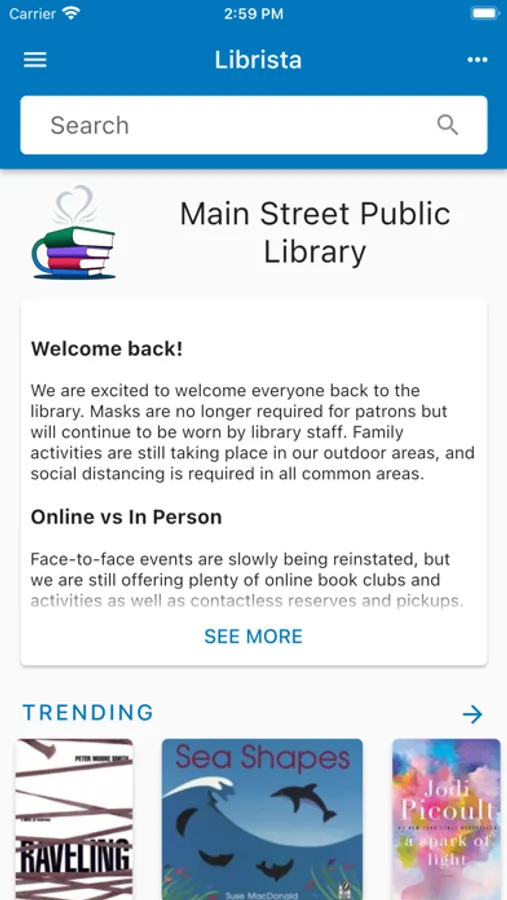
If your library uses Atriuum as its cataloging software, you can download Librista - the companion app for patrons. With Librista, you can search the library’s online catalog and view your items out, renew and reserve items, create book lists, and more.
To begin, use the Library Locator to find your Atriuum library by location or searching. To log on, enter the same credentials you normally use to access your library’s account. Based on your library’s policies, you may be able to register for a new account.
Librista features:
- View trending and newly added items.
- Access eBooks if your library partners with other providers.
- Place holds on books, DVDs, etc.
- Watch subjects, authors, or series to be notified if your library acquires new items.
- Save items and categorize them in book lists, such as Favorites, To Be Read, etc.
- Find out about community groups/events if your library posts this information.
- View account information, including items out, fines, etc.
- Set preferences for when you receive alerts (based on your library’s notification policies).
- Scan ISBNs to see if your library has a specific book before you purchase it.
- Switch between different catalogs if you sometimes visit other libraries in your area.
To begin, use the Library Locator to find your Atriuum library by location or searching. To log on, enter the same credentials you normally use to access your library’s account. Based on your library’s policies, you may be able to register for a new account.
Librista features:
- View trending and newly added items.
- Access eBooks if your library partners with other providers.
- Place holds on books, DVDs, etc.
- Watch subjects, authors, or series to be notified if your library acquires new items.
- Save items and categorize them in book lists, such as Favorites, To Be Read, etc.
- Find out about community groups/events if your library posts this information.
- View account information, including items out, fines, etc.
- Set preferences for when you receive alerts (based on your library’s notification policies).
- Scan ISBNs to see if your library has a specific book before you purchase it.
- Switch between different catalogs if you sometimes visit other libraries in your area.