AppRecs review analysis
AppRecs rating 3.9. Trustworthiness 78 out of 100. Review manipulation risk 20 out of 100. Based on a review sample analyzed.
★★★☆☆
3.9
AppRecs Rating
Ratings breakdown
5 star
75%
4 star
8%
3 star
7%
2 star
3%
1 star
8%
What to know
✓
Low review manipulation risk
20% review manipulation risk
⚠
Ad complaints
Many low ratings mention excessive ads
⚠
Pricing complaints
Many low ratings mention paywalls or pricing
About BMO Canada
Important: The BMO Canada app is designed for our Canadian based customers to access Canadian banking services. For US based customers search "BMO Digital Banking" in the App Store.
With the BMO® Mobile Banking app, completing everyday transactions is quick and easy so you can get on with your day, your way. Plus, BMO Mobile Banking is safe and secure, so you can confidently bank on the go.
We work hard to protect your confidential information and privacy. Rest assured that you are protected by our 100% Electronic Banking Guarantee. We will reimburse you 100% for any losses to your personal bank accounts resulting from unauthorized transactions through BMO Mobile Banking. For more information please visit: bmo.com/security
FEATURES:
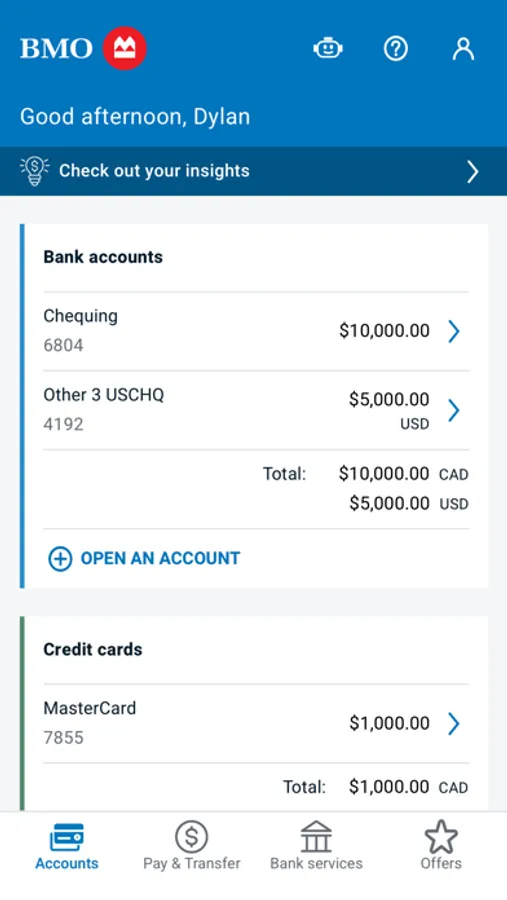
• View your banking, credit card and rewards, mortgage, and investment balances directly from your Account Summary. View transaction history on any of your accounts
• Transfer funds including cross currency and send an INTERAC e-Transfer®*
• Add/edit INTERAC e-Transfer recipients
• Pay bills, manage Payees, set up future-dated bill payments and view payment history
• View detailed account info, including credit card balances, due dates, minimum payments, mortgage details and funds on hold for bank accounts
• Book an appointment
• Save your most used BMO Debit Cards or BMO personal credit cards with nicknames to sign in quickly and securely
• Find BMO branches and ATMs
• Sign in using Touch ID for quick access to BMO Mobile Banking
• Enjoy the use of Apple Pay with your BMO Debit and Credit Cards at the cash register
GET STARTED:
To use BMO Mobile Banking, you must be registered for BMO Online Banking. Simply sign in to BMO Mobile Banking exactly as you would sign in to BMO Online Banking. If you are not registered for BMO Online Banking, visit bmo.com/onlinebanking to register today.
Learn more at:
bmo.com/mobile
BMO Bank of Montreal
bmo.com
PRIVACY DISCLOSURES
You acknowledge and understand that this app incl. updates or upgrades may (i) cause your device to automatically communicate with BMO’s servers to deliver the functionality described above and to record usage metrics, (ii) affect app-related preferences or data stored on your device, and (iii) collect, use and disclose personal information as set out in our BMO Digital privacy policy. You can withdraw your consent at any time by uninstalling the app. For help please contact us at:
BMO Bank of Montreal - Privacy.Matters@bmo.com
®Registered trade-mark of Bank of Montreal
®* INTERAC e-Transfer are registered trade-marks of Interac Inc. Used under license.
With the BMO® Mobile Banking app, completing everyday transactions is quick and easy so you can get on with your day, your way. Plus, BMO Mobile Banking is safe and secure, so you can confidently bank on the go.
We work hard to protect your confidential information and privacy. Rest assured that you are protected by our 100% Electronic Banking Guarantee. We will reimburse you 100% for any losses to your personal bank accounts resulting from unauthorized transactions through BMO Mobile Banking. For more information please visit: bmo.com/security
FEATURES:
• View your banking, credit card and rewards, mortgage, and investment balances directly from your Account Summary. View transaction history on any of your accounts
• Transfer funds including cross currency and send an INTERAC e-Transfer®*
• Add/edit INTERAC e-Transfer recipients
• Pay bills, manage Payees, set up future-dated bill payments and view payment history
• View detailed account info, including credit card balances, due dates, minimum payments, mortgage details and funds on hold for bank accounts
• Book an appointment
• Save your most used BMO Debit Cards or BMO personal credit cards with nicknames to sign in quickly and securely
• Find BMO branches and ATMs
• Sign in using Touch ID for quick access to BMO Mobile Banking
• Enjoy the use of Apple Pay with your BMO Debit and Credit Cards at the cash register
GET STARTED:
To use BMO Mobile Banking, you must be registered for BMO Online Banking. Simply sign in to BMO Mobile Banking exactly as you would sign in to BMO Online Banking. If you are not registered for BMO Online Banking, visit bmo.com/onlinebanking to register today.
Learn more at:
bmo.com/mobile
BMO Bank of Montreal
bmo.com
PRIVACY DISCLOSURES
You acknowledge and understand that this app incl. updates or upgrades may (i) cause your device to automatically communicate with BMO’s servers to deliver the functionality described above and to record usage metrics, (ii) affect app-related preferences or data stored on your device, and (iii) collect, use and disclose personal information as set out in our BMO Digital privacy policy. You can withdraw your consent at any time by uninstalling the app. For help please contact us at:
BMO Bank of Montreal - Privacy.Matters@bmo.com
®Registered trade-mark of Bank of Montreal
®* INTERAC e-Transfer are registered trade-marks of Interac Inc. Used under license.