In this app, users can organize, secure, and edit photos within customizable albums. Includes security features, editing tools, and import options from social media and local libraries.
AppRecs review analysis
AppRecs rating 4.2. Trustworthiness 71 out of 100. Review manipulation risk 28 out of 100. Based on a review sample analyzed.
★★★★☆
4.2
AppRecs Rating
Ratings breakdown
5 star
59%
4 star
28%
3 star
7%
2 star
3%
1 star
3%
What to know
✓
Low review manipulation risk
28% review manipulation risk
✓
Credible reviews
71% trustworthiness score from analyzed reviews
⚠
Ad complaints
Many low ratings mention excessive ads
About Eternalbum
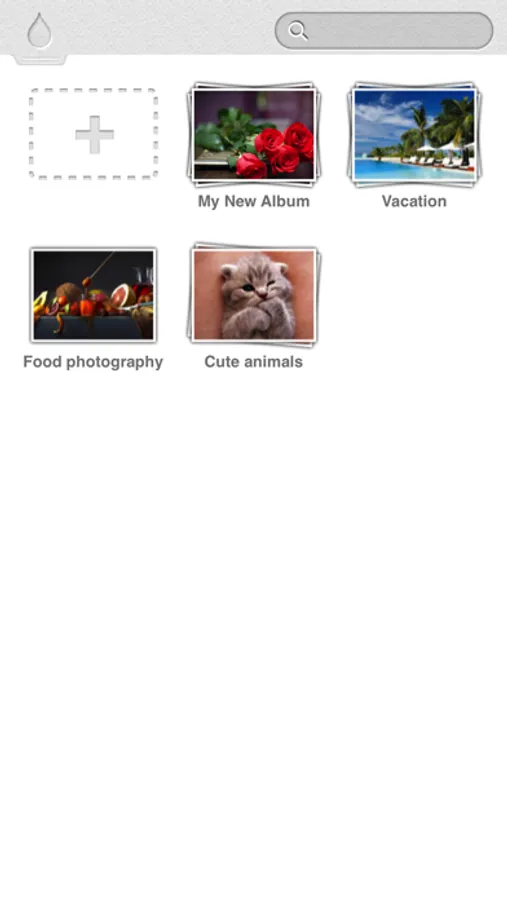
Eternalbum, a smarter way to organize, secure, edit and share you photos in a single app.
*:._.:*~*:._.:*~*:._.:*~*:._.:*~*:._.:*~*:._.:*~*:.
*:._.:*~*:._.:*~Organize with style*:._.:*~*:._
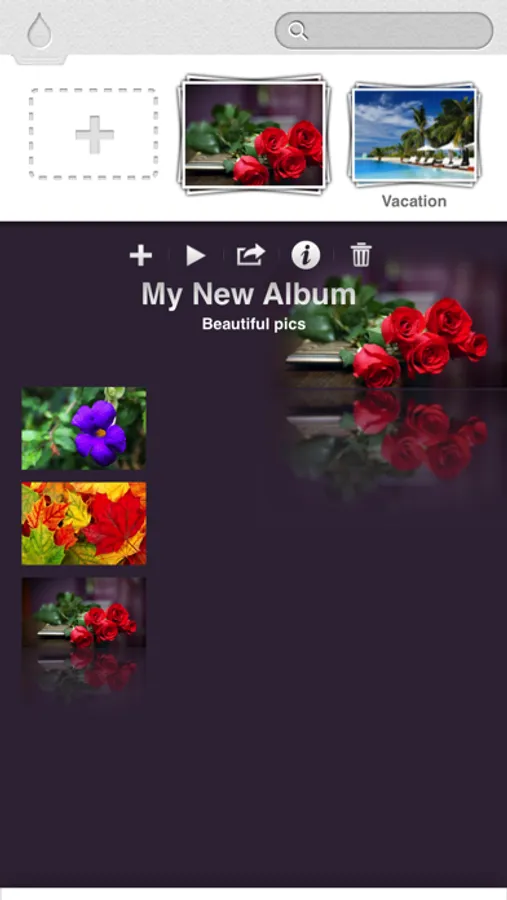
- Stylish individual album layout with customizable album cover and album background
- unique 3D browsing experience
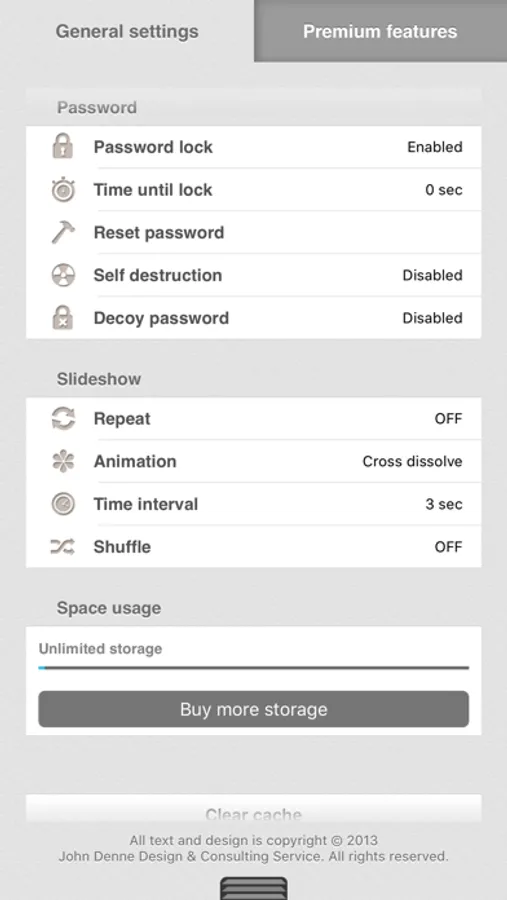
- Play slideshow
*:._.:*~*:._.:*~ Security *:._.:*~*:._.:*~
- Set up an auto lock with password to protect your photos from preying eyes.
- Set up pass lock for each album.(Add-on needed)
- Set up a decoy password in case an annoying person insists to see your photos. Fake contents (photos in your local library) will be presented when accessed with a decoy password. (Add-on needed)
- Capture intruder's photo whenever an incorrect password or a decoy password is entered.(Same add-on as above)
*:._.:*~*:._.:*~Powerful editor*:._.:*~*:._.:*~
- Unlike most photo editor apps, Eternalbum keeps edited photo's original size. (Add-on needed, otherwise high resolution size)
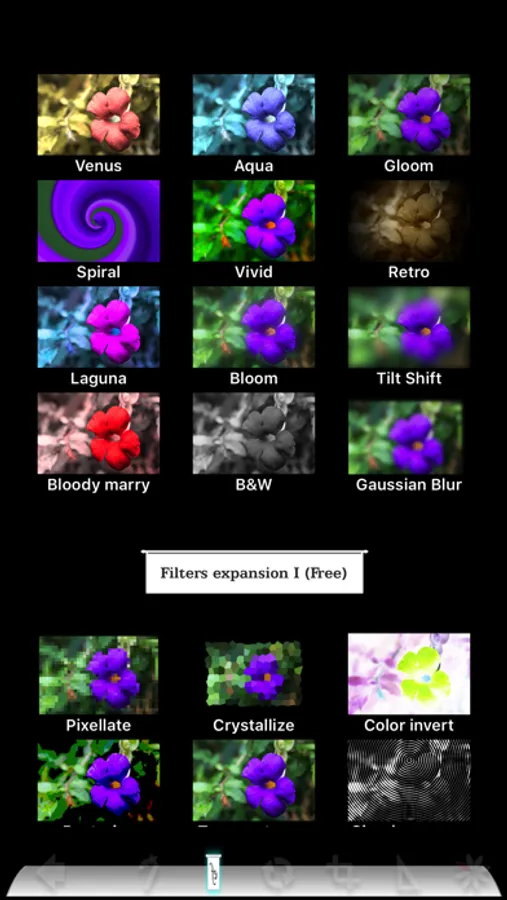
- Provides auto enhancement, contrast, brightness, saturation, sharpness adjustment, rotation, flip, crop tools and awesome tools like color accent and horizontal straighten tools.
- Real time adjustments.
- Edit with ease - simple gestures
- Dozens free and cool filters.
- Undo at anytime
*:._.:*~*:._.:*~photo search*:._.:*~*:._.:*~
- Unique colour-based searching function.
- Search history
*:._.:*~Import from local and socials*:._.:*~
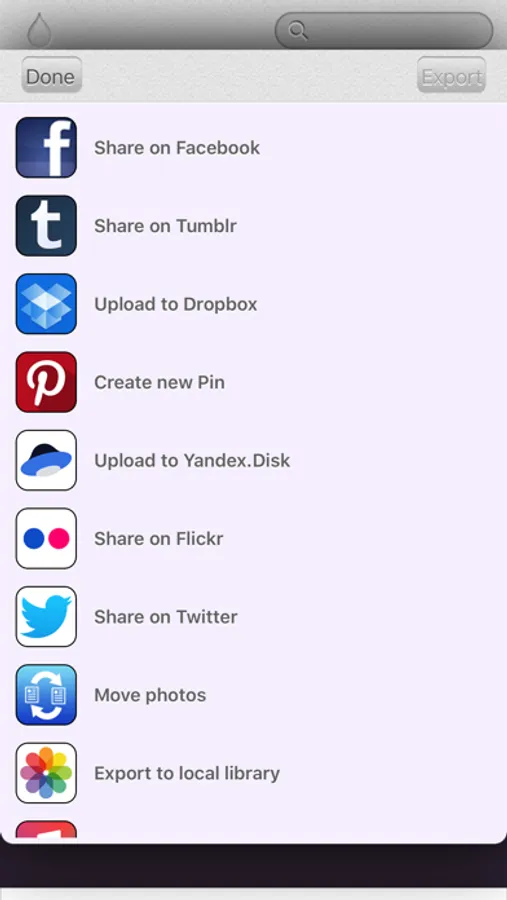
- Import photos from Facebook, Instagram, Pinterest, Google Photos, tumblr, flickr, local library, other apps, and camera.
*:._.:*~*:._.Export / share photos*:._.:*~*:.
- Share photos on Facebook, Google Photos, Twitter, tumblr, flickr, Yandex.Disk and Dropbox.
- Send photos via email
- Send photos to computer with iTunes file sharing
- Export to Air print
*:._.:*~*:._.:*~*:._.:*~*:._.:*~*:._.:*~*:._.:*~*
FAQ
Q: Where can I find the app settings.
A: Tap top-left Eternalbum icon to enter settings.
Q: How can I move photos?
A: 1. move photos inside same album: long-press photo and drag-drop it. 2. move photos to a different album: inside sharing photos, "to other album".
Q: Why people can still see some of my photos with a decoy password?
A: The photos presented when accessed with decoy password are not the photos you saved in Eternalbum but in local Photos app.
Q: How can I backup all my photos saved in Eternalbum?
A: You can backup your Eternalbum app with iTunes, your photos will be backed-up with the app.
*:._.:*~*:._.:*~*:._.:*~*:._.:*~*:._.:*~*:._.:*~*:.
*:._.:*~*:._.:*~Organize with style*:._.:*~*:._
- Stylish individual album layout with customizable album cover and album background
- unique 3D browsing experience
- Play slideshow
*:._.:*~*:._.:*~ Security *:._.:*~*:._.:*~
- Set up an auto lock with password to protect your photos from preying eyes.
- Set up pass lock for each album.(Add-on needed)
- Set up a decoy password in case an annoying person insists to see your photos. Fake contents (photos in your local library) will be presented when accessed with a decoy password. (Add-on needed)
- Capture intruder's photo whenever an incorrect password or a decoy password is entered.(Same add-on as above)
*:._.:*~*:._.:*~Powerful editor*:._.:*~*:._.:*~
- Unlike most photo editor apps, Eternalbum keeps edited photo's original size. (Add-on needed, otherwise high resolution size)
- Provides auto enhancement, contrast, brightness, saturation, sharpness adjustment, rotation, flip, crop tools and awesome tools like color accent and horizontal straighten tools.
- Real time adjustments.
- Edit with ease - simple gestures
- Dozens free and cool filters.
- Undo at anytime
*:._.:*~*:._.:*~photo search*:._.:*~*:._.:*~
- Unique colour-based searching function.
- Search history
*:._.:*~Import from local and socials*:._.:*~
- Import photos from Facebook, Instagram, Pinterest, Google Photos, tumblr, flickr, local library, other apps, and camera.
*:._.:*~*:._.Export / share photos*:._.:*~*:.
- Share photos on Facebook, Google Photos, Twitter, tumblr, flickr, Yandex.Disk and Dropbox.
- Send photos via email
- Send photos to computer with iTunes file sharing
- Export to Air print
*:._.:*~*:._.:*~*:._.:*~*:._.:*~*:._.:*~*:._.:*~*
FAQ
Q: Where can I find the app settings.
A: Tap top-left Eternalbum icon to enter settings.
Q: How can I move photos?
A: 1. move photos inside same album: long-press photo and drag-drop it. 2. move photos to a different album: inside sharing photos, "to other album".
Q: Why people can still see some of my photos with a decoy password?
A: The photos presented when accessed with decoy password are not the photos you saved in Eternalbum but in local Photos app.
Q: How can I backup all my photos saved in Eternalbum?
A: You can backup your Eternalbum app with iTunes, your photos will be backed-up with the app.