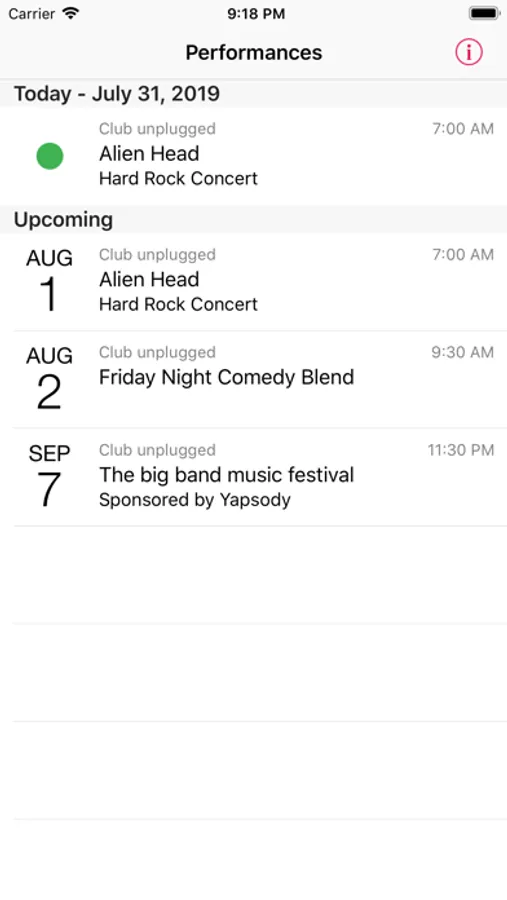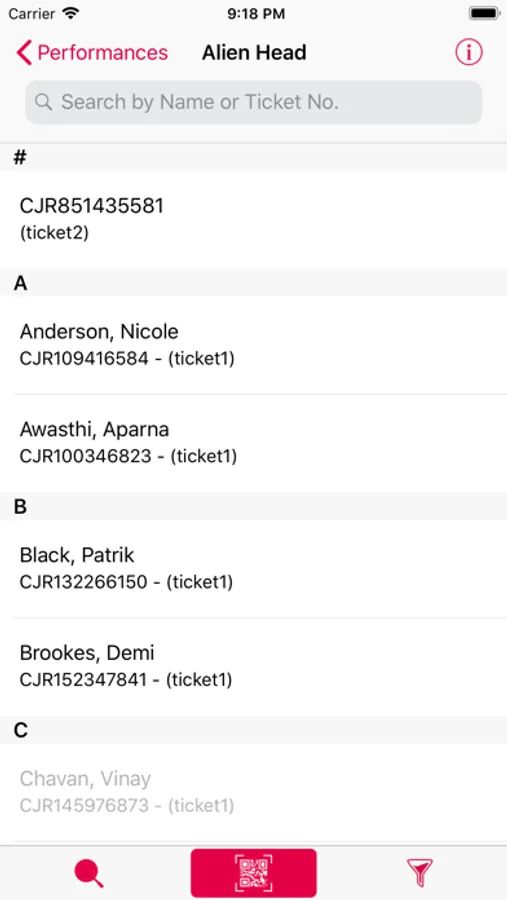
In this event management app, you can scan e-ticket QR codes, manually enter attendee information, or scroll through the attendee list. Includes real-time data synchronization, attendance tracking, and customizable staff permissions.
AppRecs review analysis
AppRecs rating 4.6. Trustworthiness 78 out of 100. Review manipulation risk 24 out of 100. Based on a review sample analyzed.
★★★★☆
4.6
AppRecs Rating
Ratings breakdown
5 star
89%
4 star
7%
3 star
3%
2 star
0%
1 star
1%
What to know
✓
Low review manipulation risk
24% review manipulation risk
✓
Credible reviews
78% trustworthiness score from analyzed reviews
✓
High user satisfaction
89% of sampled ratings are 5 stars
About Yapsody YapScan
*** For Yapsody Presenters Only ***
Yapsody Presenters -- Check in event attendees at your event site with Yapsody YapScan app for iOS devices by scanning e-ticket QR Codes or manually by entering a name, entering an e-ticket number, or using gestures to scroll through your attendee list.
All data is synched real-time between your mobile devices and Yapsody servers to prevent the same ticket from being used at multiple entry points and to ensure that last minute sales will validate regardless of time or place purchased.
Features:
- Validate attendees by scanning e-ticket QR codes using your mobile device's camera, manually entering attendees' names, manually entering e-ticket numbers, or scrolling through the attendee list on your iPhone, iPad, or iPod Touch.
- Automatic synching between mobile devices and Yapsody servers ensures that each mobile device is being constantly updated with the latest ticket status.
- View attendance stats on your Apple device.
- Set scan permissions for your staff online on a person-by-person basis. (Each staff member has separate login credentials.)
- Separate permissions for "unscanning" tickets so, for example, you can elect to reserve the "unscanning" function for specific management staff.
- Restrict scanning access to specific events on a person-by-person basis.
- For events allowing multiple entries per ticket, set the precise number of scans/check-ins allowed online
- Set alerts for specific ticket types online. For example, set alerts for Student tickets so that mobile devices alert your entry staff to check for student IDs.
- Restrict the time at which your staff can begin scanning tickets.
- All ticket data is downloaded to the mobile device, so continue to scan even if you lose Internet connection. YapScan will automatically. Synchronise with the Yapsody servers as soon as connection is restored.
- Use third party hardware laser scanners from Infinea Linea Series, Socket Scanner Series and Honeywell Captuvo Series for faster ticket scanning experience.
Set up your event at Yapsody.com and begin using YapScan today.
Yapsody Presenters -- Check in event attendees at your event site with Yapsody YapScan app for iOS devices by scanning e-ticket QR Codes or manually by entering a name, entering an e-ticket number, or using gestures to scroll through your attendee list.
All data is synched real-time between your mobile devices and Yapsody servers to prevent the same ticket from being used at multiple entry points and to ensure that last minute sales will validate regardless of time or place purchased.
Features:
- Validate attendees by scanning e-ticket QR codes using your mobile device's camera, manually entering attendees' names, manually entering e-ticket numbers, or scrolling through the attendee list on your iPhone, iPad, or iPod Touch.
- Automatic synching between mobile devices and Yapsody servers ensures that each mobile device is being constantly updated with the latest ticket status.
- View attendance stats on your Apple device.
- Set scan permissions for your staff online on a person-by-person basis. (Each staff member has separate login credentials.)
- Separate permissions for "unscanning" tickets so, for example, you can elect to reserve the "unscanning" function for specific management staff.
- Restrict scanning access to specific events on a person-by-person basis.
- For events allowing multiple entries per ticket, set the precise number of scans/check-ins allowed online
- Set alerts for specific ticket types online. For example, set alerts for Student tickets so that mobile devices alert your entry staff to check for student IDs.
- Restrict the time at which your staff can begin scanning tickets.
- All ticket data is downloaded to the mobile device, so continue to scan even if you lose Internet connection. YapScan will automatically. Synchronise with the Yapsody servers as soon as connection is restored.
- Use third party hardware laser scanners from Infinea Linea Series, Socket Scanner Series and Honeywell Captuvo Series for faster ticket scanning experience.
Set up your event at Yapsody.com and begin using YapScan today.