AppRecs review analysis
AppRecs rating 4.0. Trustworthiness 72 out of 100. Review manipulation risk 23 out of 100. Based on a review sample analyzed.
★★★☆☆
4.0
AppRecs Rating
Ratings breakdown
5 star
70%
4 star
7%
3 star
7%
2 star
0%
1 star
15%
What to know
✓
Low review manipulation risk
23% review manipulation risk
✓
Credible reviews
72% trustworthiness score from analyzed reviews
✓
High user satisfaction
78% of sampled ratings are 4+ stars (4.2★ average)
About PinGuy
Your tool for perfect leveling of a pinball machine.
1. Just calibrate your iPhone the first time on a perfect 0° ground as zero
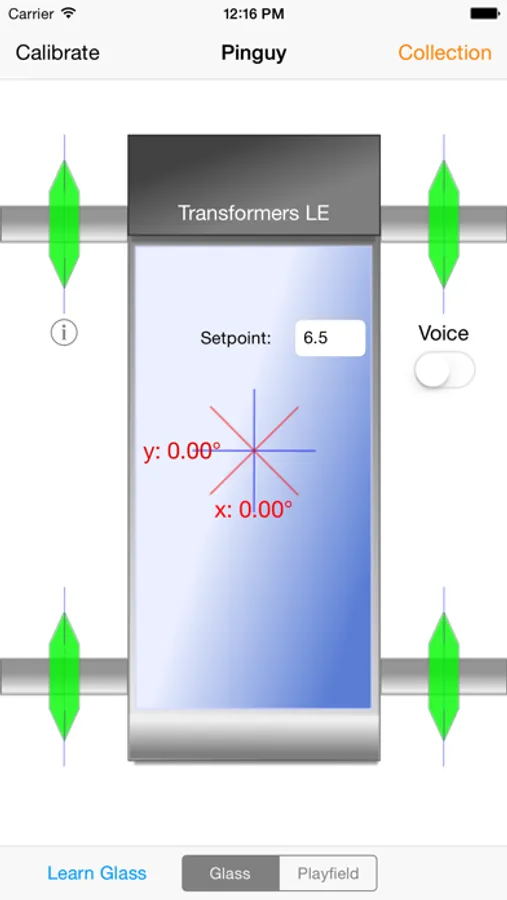
2. Put your phone on the playfield of your pinball machine and watch the 4 green markers. These represent the legs of your pinball.
3. The marker should be inside the blue line. If the marker is outside the leg must be screwed in.
4. If all is perfectly aligned, all markers will be on the blue line. The moving red crosshair overlaps the green one in the middle.
5. After inserting the glass, put your iPhone on it and switch the app to glass.
6. Now you can calibrate the app on the glass pane.
If you want to check later to see if your pinball is still properly aligned, simply put your iPhone on the glass.
1. Just calibrate your iPhone the first time on a perfect 0° ground as zero
2. Put your phone on the playfield of your pinball machine and watch the 4 green markers. These represent the legs of your pinball.
3. The marker should be inside the blue line. If the marker is outside the leg must be screwed in.
4. If all is perfectly aligned, all markers will be on the blue line. The moving red crosshair overlaps the green one in the middle.
5. After inserting the glass, put your iPhone on it and switch the app to glass.
6. Now you can calibrate the app on the glass pane.
If you want to check later to see if your pinball is still properly aligned, simply put your iPhone on the glass.