AppRecs review analysis
AppRecs rating 4.1. Trustworthiness 74 out of 100. Review manipulation risk 22 out of 100. Based on a review sample analyzed.
★★★★☆
4.1
AppRecs Rating
Ratings breakdown
5 star
58%
4 star
27%
3 star
4%
2 star
8%
1 star
4%
What to know
✓
Low review manipulation risk
22% review manipulation risk
✓
Credible reviews
74% trustworthiness score from analyzed reviews
✓
High user satisfaction
85% of sampled ratings are 4+ stars (4.3★ average)
About Cuneiform Edit
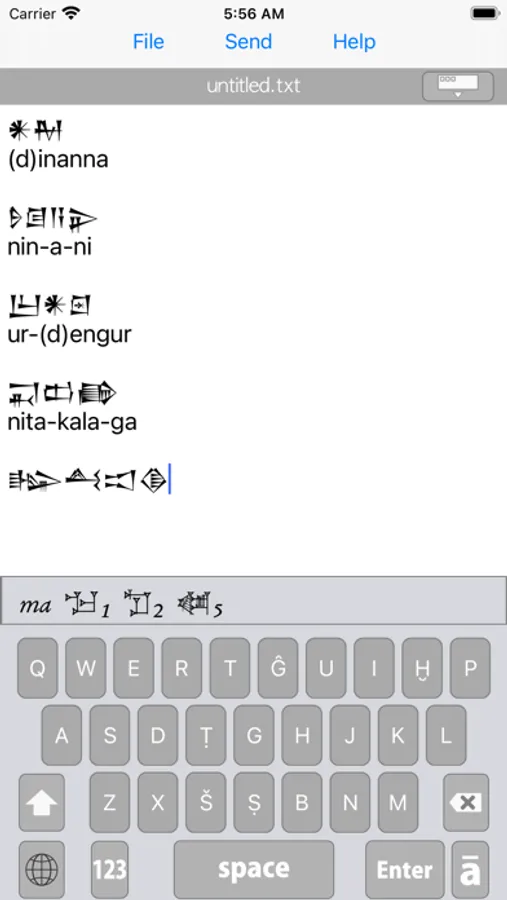
This application is text editor with cuneiform keyboard for unicode text.
This text editor can edit sumerian language and akkadian language.
Text data can be saved in UTF-8 format.
This app is equipped with a mail transmission function.
This app includes a custom cuneiform keyboard.
In order to use custom keyboard, you need to manual setting in iOS “settings” screen.
if you don’t use the cuneiform Keyboard, you can use this application as normal text editor.
Procedures for using the custom keyboard
1 Please update to the latest version of iOS, if possible.If the version of the OS is old, might be custom keyboard can not be selected.
2. Return to home screen.
3. Open the Settings app.
4. Select General > Keyboard > Keyboards.
5. Touch “Add New Keyboard”.
6. Please check the item “CuneiformEdit” in “THIRD-PARTY KEYBOARDS” and select this.
7. Now you can use the cuneiform keyboard.
Changing the keyboard can be done by touching the globe key.
This text editor can edit sumerian language and akkadian language.
Text data can be saved in UTF-8 format.
This app is equipped with a mail transmission function.
This app includes a custom cuneiform keyboard.
In order to use custom keyboard, you need to manual setting in iOS “settings” screen.
if you don’t use the cuneiform Keyboard, you can use this application as normal text editor.
Procedures for using the custom keyboard
1 Please update to the latest version of iOS, if possible.If the version of the OS is old, might be custom keyboard can not be selected.
2. Return to home screen.
3. Open the Settings app.
4. Select General > Keyboard > Keyboards.
5. Touch “Add New Keyboard”.
6. Please check the item “CuneiformEdit” in “THIRD-PARTY KEYBOARDS” and select this.
7. Now you can use the cuneiform keyboard.
Changing the keyboard can be done by touching the globe key.